
OwnMates Feature
Status
Share a photo or a short video that your friends can watch for 24 hours.
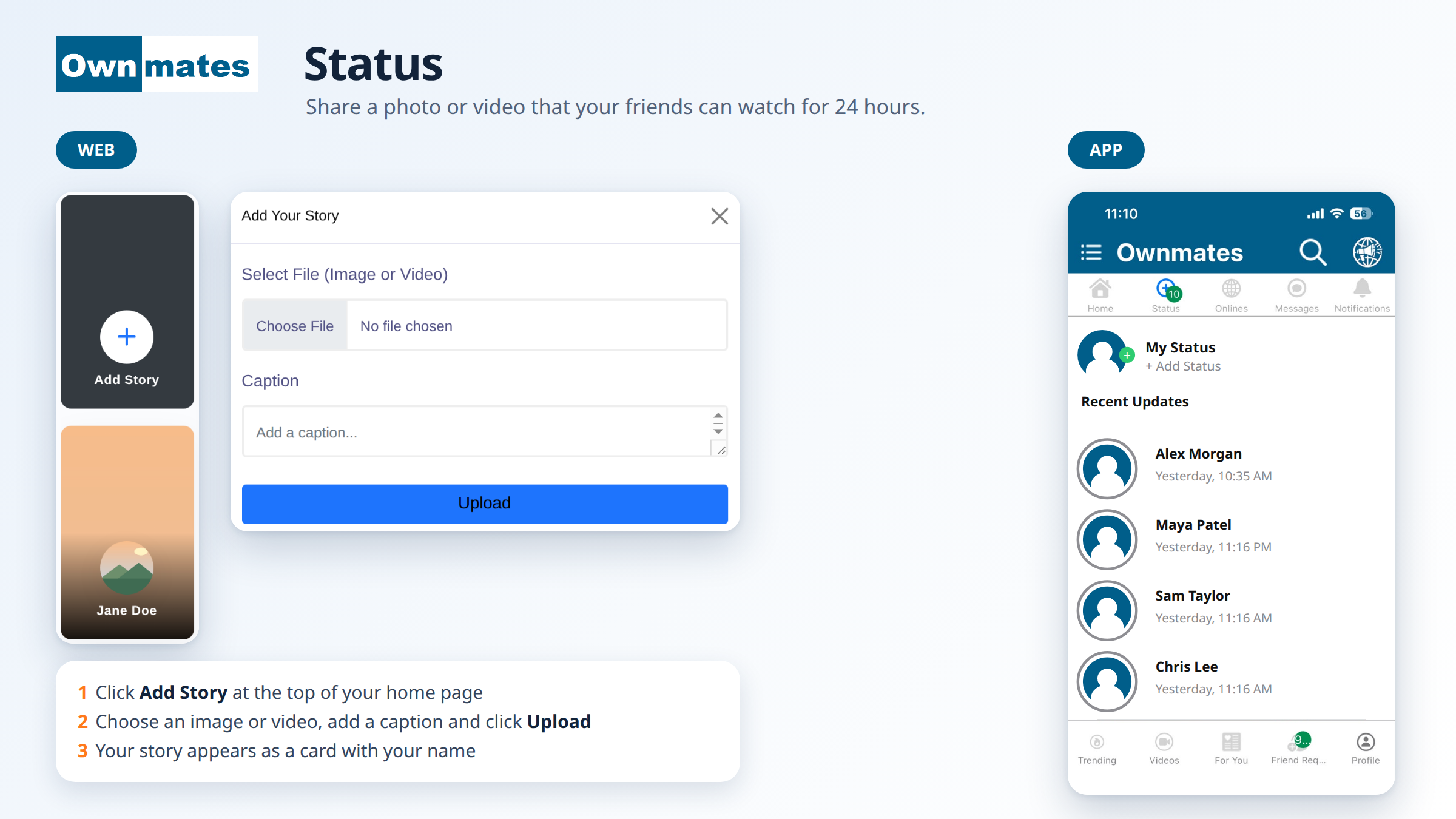
A Status is a quick photo or video you share with your friends. On the website it is called a story. In the app it is called Status. Statuses disappear after 24 hours.
Add a story on the website
- On your home page, click Add Story at the top.
- Choose an image or a video under Select File (Image or Video).
- Add a caption if you like.
- Click Upload. You’ll see “Story added successfully!”
Your story shows up as a card with your name, next to the Add Story card.
Add a status in the app
- Tap Status in the bar at the top of the app.
- Tap My Status or + Add Status.
- Choose your photo or video and share it.
See what your friends posted
In the app, Recent Updates lists the latest statuses with the name and the time, for example “Yesterday, 10:35 AM”. Tap one to watch it. The number on the Status tab shows how many new ones there are.
Quick answers
How long does a status stay up?
24 hours.
Can I add a video?
Yes. Choose an image or a video.
Is a story the same as a status?
Yes. The website says story and the app says status.