
OwnMates Feature
Profile Privacy
Decide who can see your friendlist, comment on your posts and message you.
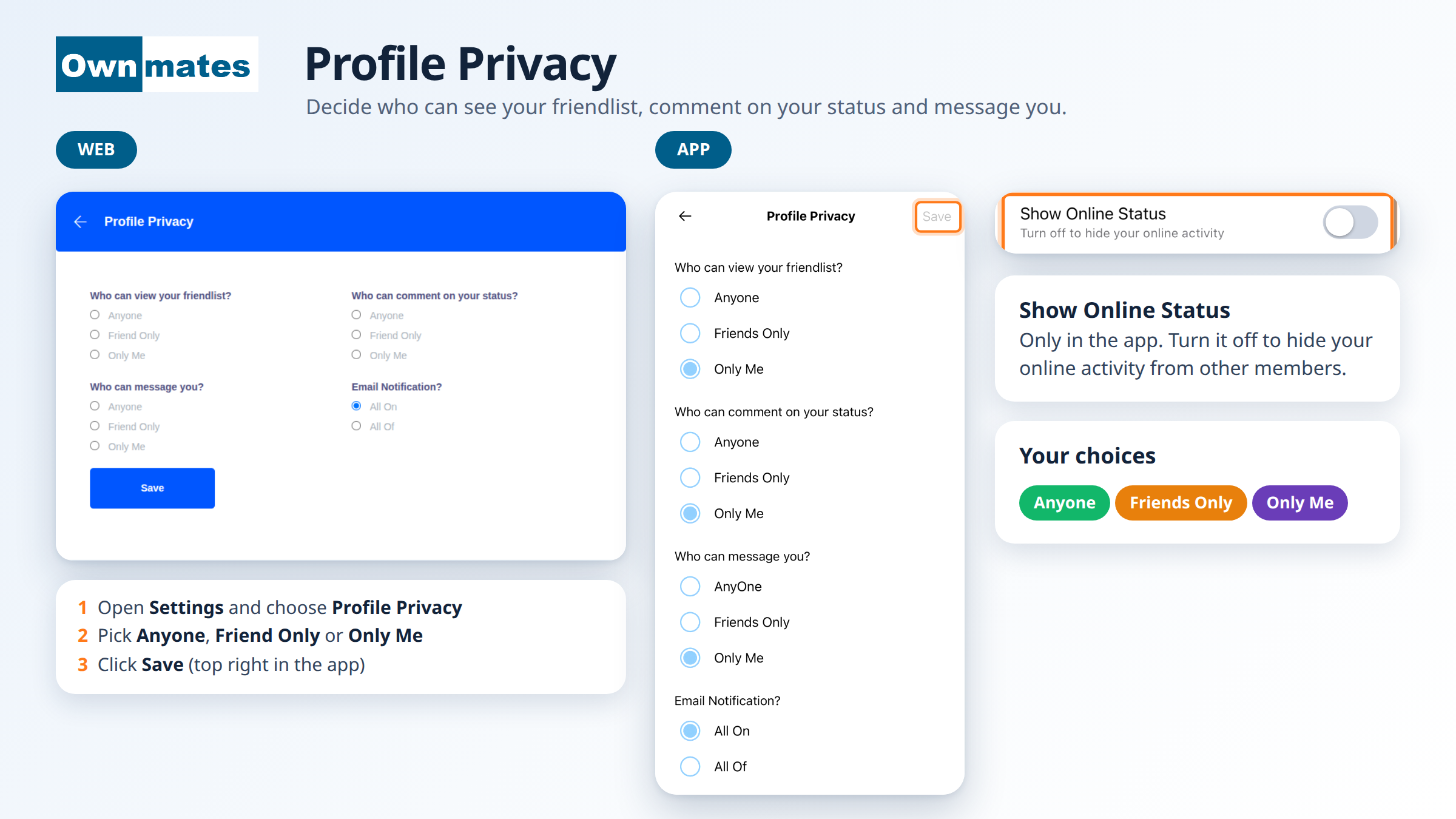
This page holds your privacy choices for the whole account. You set them once and OwnMates follows them. They also work as your post privacy, because they decide who can comment on your posts.
On the website
- Open Settings and choose Profile Privacy.
- For each question, pick Anyone, Friend Only or Only Me.
- Click Save.
In the app
- Open the menu and tap Profile Privacy.
- Pick Anyone, Friends Only or Only Me for each question.
- Tap Save at the top right.
What you can choose
- Who can view your friendlist? Who can see the people you’re friends with.
- Who can comment on your status? Who can comment on your posts. See Manage Comments.
- Who can message you? Who can send you a message. See Message Controls.
- Email Notification? Notification emails on or off. See Notification Settings.
- Show Online Status (app only). Turn it off to hide your online activity from other members.
What the three options mean
- Anyone: every OwnMates member.
- Friend Only: only your friends.
- Only Me: nobody else.
Remember to save. A change you don’t save isn’t kept.
Quick answers
Can I change my mind later?
Yes. Open Profile Privacy again, pick something else and save.
What does someone see if they can’t message me?
The chat tells them they don’t have permission to send you messages.