
OwnMates Feature
Post Privacy
Choose who can comment on your posts, and delete a post whenever you don’t want it up any more.
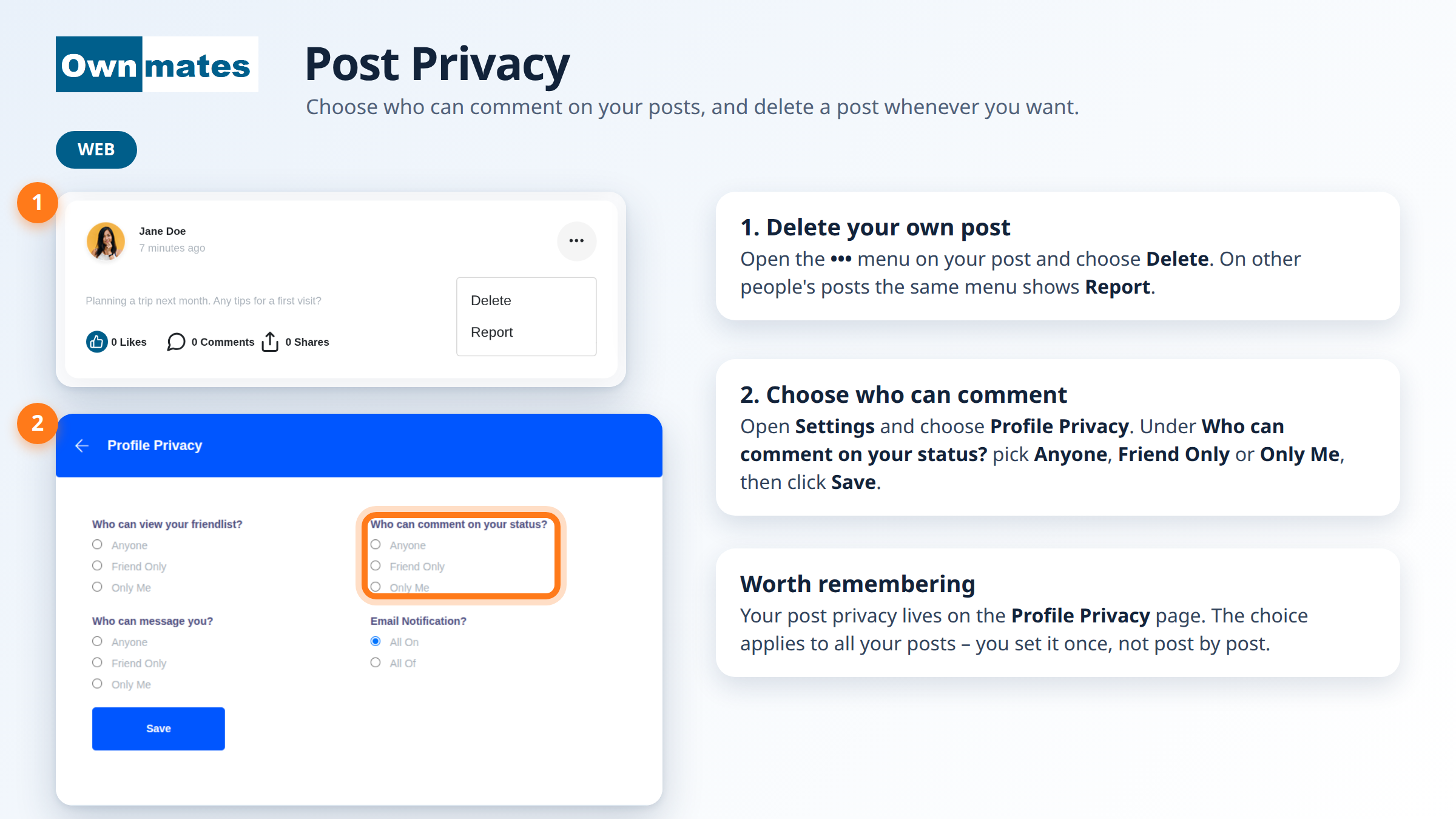
OwnMates keeps your post privacy in one place: the Profile Privacy page in Settings. There’s no separate setting for each post. What you pick applies to all of them.
Delete one of your posts
- Find your post.
- Click the three-dot menu at the top right of the post.
- Choose Delete.
On someone else’s post, the same menu shows Report instead.
Choose who can comment
- Open Settings and choose Profile Privacy.
- Under Who can comment on your status? pick Anyone, Friend Only or Only Me.
- Click Save.
In the app
The app has the same settings on its Profile Privacy screen. Pick an option under Who can comment on your status? (the app calls the middle one Friends Only), then tap Save at the top right.
Quick answers
Can I make one post private?
Not at the moment. The comment setting works for all your posts at once.
Who can delete my post?
You can. Other members can only report it.
Where are my other privacy settings?
On the same page. See Profile Privacy.